
Different Ways to Find Your ENEOS Products
Autosphere » Mechanical »
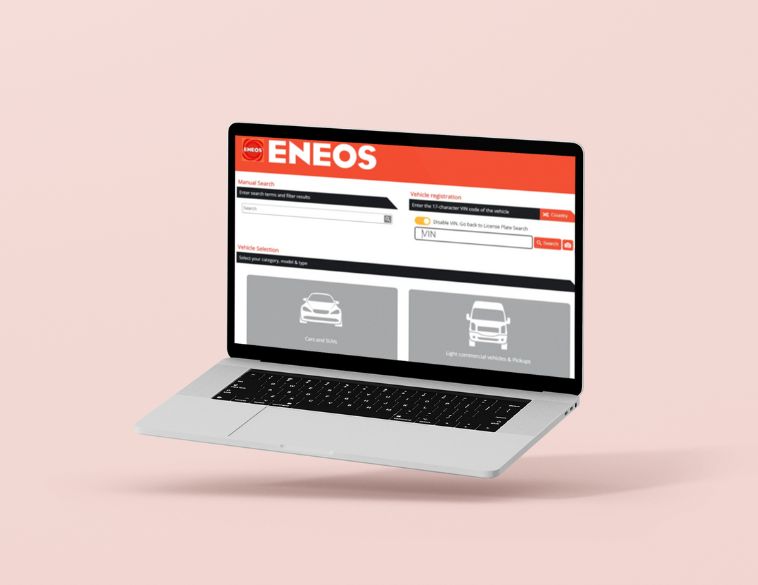
ENEOS Oil selection tool. Photo ENEOS
Most vehicles in the market take more than one ENEOS fluid.
To make sure the correct products are being selected, there are now four ways to search using the ENEOS Oil Selector tool on the ENEOS website.
- Manual Search: As always, you can search for your vehicle to get product recommendations. Type your Year, Make, and Model in the Manual Search box to see a list of corresponding vehicle options from which you can select.
- Vehicle Selection: Start by selecting either Cars and SUVs or Light Commercial vehicles & Pickups, then the Year, Make, Model, and vehicle Type to find the product recommendations.
- License Plate: An easy way to search for product matches, simply enter the license plate of a vehicle to find the recommendations for the vehicle.
- New feature—VIN Lookup: By entering the Vehicle Identification Number (VIN), the exact product match will be displayed for the vehicle.
The Product Search results will appear with matches for engine, transmission, and other vehicle components, with additional links to see more information about each product.



JOBS
 |  RIVE-SUD DE MONTRÉAL RIVE-SUD DE MONTRÉAL Full time Full time |
 | MONTRÉAL Full time |
| MONTRÉAL Permanent |
 | BROSSARD Full time |
 | SAINT-BRUNO Full time |